category

0
total
0
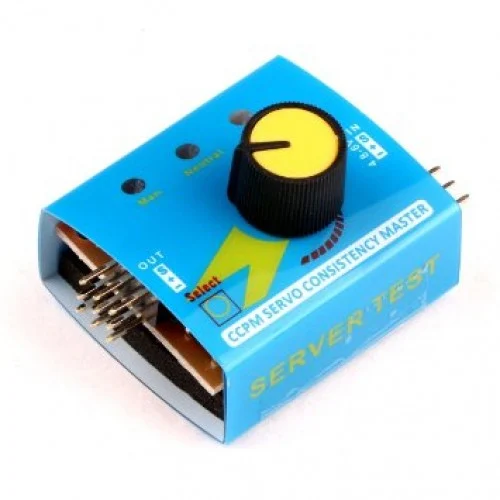

Digital Multi Servo Tester ESC RC Consistency CCPM Master Speed Control
Availability:
in stockServo Tester
A servo tester is an essential tool for hobbyists and professionals alike who work with RC (remote control) servos. This versatile and user-friendly device allows you to quickly test and calibrate servos for various applications, from drones and robots to model airplanes and cars. The servo tester can facilitate settings for different servo types, ensuring optimal performance and reliability.
Key Features
- Adjustable Pulse Width: The servo tester features a variable pulse width control, allowing users to adjust the output pulse width from 1ms to 2ms, accommodating various servo specifications.
- Easy to Use: The intuitive design of the servo tester includes a simple interface with clearly labeled controls, making it straightforward for users to understand and operate.
- LED Indicators: Built-in LED indicators provide visual feedback on servo activity, ensuring users can monitor performance at a glance.
- Battery Powered: The servo tester is powered by a standard battery, providing portability and convenience for outdoor or field testing.
- Compact Design: Its lightweight and compact design makes it easy to store and transport, ideal for users who require mobility.
Applications
The servo tester can be used in a variety of applications, including:
- Testing RC servos to ensure proper functionality and response.
- Calibrating servos for robotics projects, ensuring precise movement control.
- Troubleshooting RC vehicles and drones to diagnose servo issues.
- Setting up control surfaces in model aircraft and cars.
Energy Efficiency
This servo tester is designed with energy efficiency in mind. It operates on low power consumption, ensuring that battery life is maximized during testing sessions. Users can enjoy extended usage without the need for constant battery replacements, making it an economical choice for frequent users.
How to Use
Using the servo tester is straightforward:
- Connect the servo to the tester's output port.
- Power on the tester using a suitable battery.
- Adjust the pulse width using the control knob to set the desired response of the servo.
- Observe the operation of the servo through LED indicators to verify its performance.
For a detailed datasheet, you can download it here.
related products

NFC Card 13.56MHz – NTAG215 Chip (White PVC)

Proximity RFID Card 125 KHz Printable
MAX30100 Pulse Oximeter Heart Rate Sensor Module

Voltage and Current Sensor ( MAX471 )

Color Sensor with 4 LEDs ( TCS3200 )

Popular Brand